Context #
I always feel like I need to provide a whole bunch of context for what I'm doing first given the esotericism of each topic, so I'll just go ahead and provide a quick summary.
Given the nature of my work, I'm naturally curious regarding the inner workings of Windows's visual style system. This curiosity goes further than just Windows 7 or Vista, as they naturally inherit the theme engine of old Windows XP, in cases where the new way of rendering simply cannot happen. In other words, in order to truly capture "the vibes", the rabbit hole must go deeper and deeper, further back in time when Stardock collaborated with Microsoft and Nintendo made official themes for Windows using WindowBlinds.
Conversely, given the nature of Microsoft's work, trying to understand these inner workings is not a trivial task. You might think to yourself that if only the source code were open for all, that this task of understanding how [thing] works would be much simpler. But as the Internet is quick to remind, I'm almost glad Windows isn't open source, because I don't need to consider the possibility of wasting hours upon hours trying to understand all the Windows-isms that are probably omnipresent in the source code. The journey to figuring things out wouldn't be so satisfying like that, and would likely be more frustrating than anything else.
Having met with likeminded people, we decided to start an organization on GitHub with a rather humorous name, but with ultimately the same motivations as described above.
The problem #
In trying to understand how Windows XP theming system works, we ended up discovering that the devil is in the details. Windows XP allows the user to tweak the UI in many ways, one being the ability to change the size of the window caption buttons.
As the size parameter provided is correlated with the height of the caption button, this naturally begs the question: what about the width of the button?
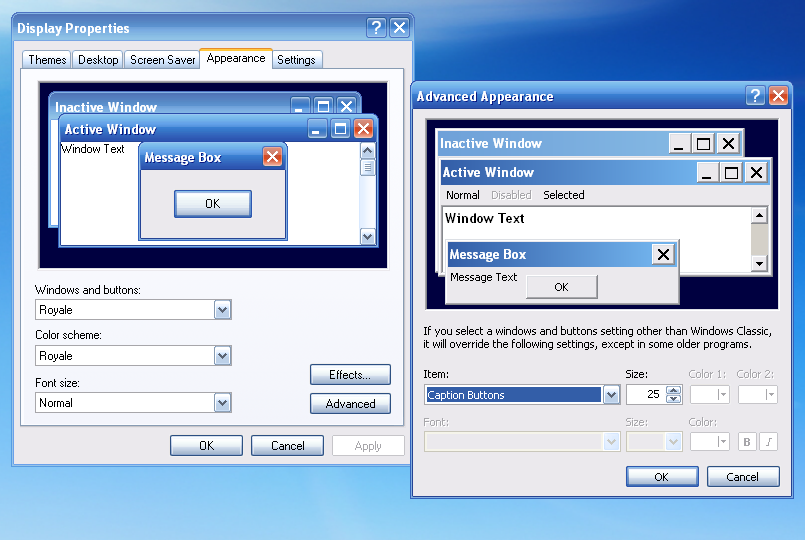 'Advanced Appearance' page in Windows XP
Now, for the most basic case of square caption buttons, the answer is pretty simple. Generalizing this further and assuming any rectangular shape, answering this now becomes more challenging for no real reason, as you'd think something as simple as this wouldn't be a big mystery.
Measurements #
In order to get a sense for this problem, a good idea would be to measure the results (the width of the caption buttons) and tweak settings around to get a small collection of samples. We only need to keep track of one caption button as the rendering logic is the same for all of them.
A few important details #
Before getting to the measurements themselves, it's important to keep a few things in mind. The first is that below a certain size, the caption buttons stop shrinking, and instead reach a sort of lower bound. This happens as a result of the titlebar text font size contributing to that lower bound. In order to mitigate this and get a less confusing set of data, all measurements here will be done with the titlebar font size being set to a reasonable minimum, which is 6.
The second interesting detail is that the "Caption Button" item is related to the "Titlebar Size" item, with practically a 1:1 correlation. The only difference is that the Caption Button item is allowed to go below the lower bound value, even though that doesn't matter as the lower bound is applied regardless.
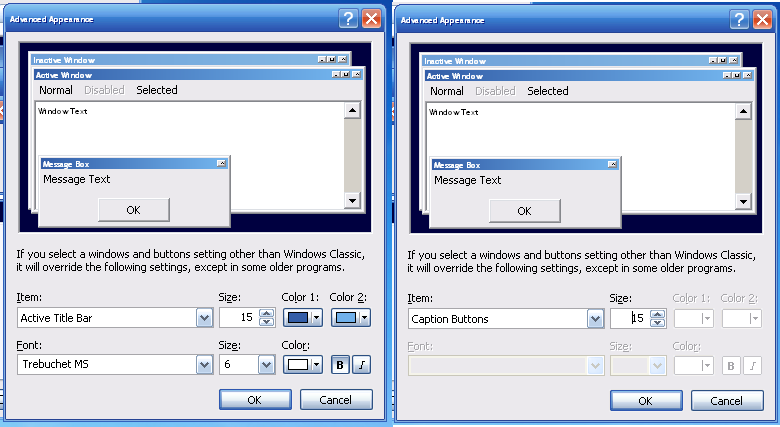
The third important detail is that the resulting width depends on the width and height of the cropped button texture as found in the msstyles of the selected theme.
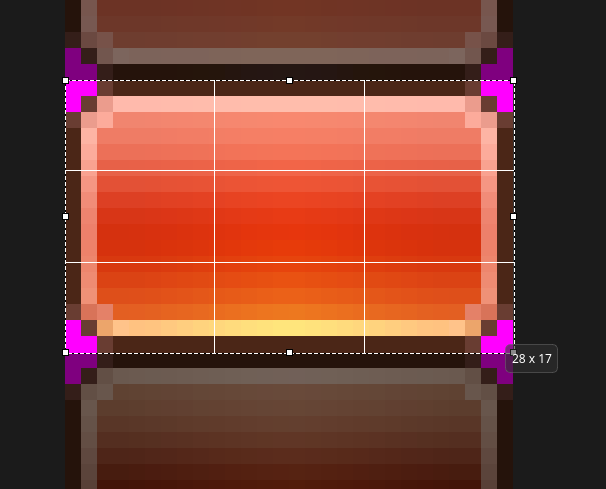 aero 7.5.msstyles - BLUE_CLOSEBUTTON_BMP
This is where things get a little less clear. If we look at the Royale theme and its default caption size of 25, we would expect the button to be 25x25px large, right?
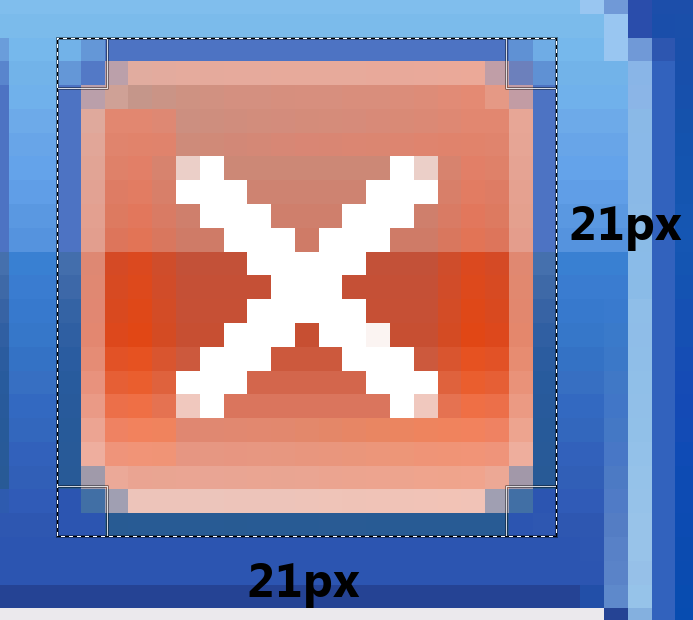 Why it is 21x21px instead of 25x25px? What gives?
Well, that's weird. At least we could've safely assumed that the end result would be square, given that the button texture itself is square. Repeating this for a couple of other values, we'll see that the result is always off by 4 pixels. In fact, repeating this for other themes as well, we can see that there's a 4 pixel discrepancy in the rendered button height, in the form of some kind of top and bottom margins:
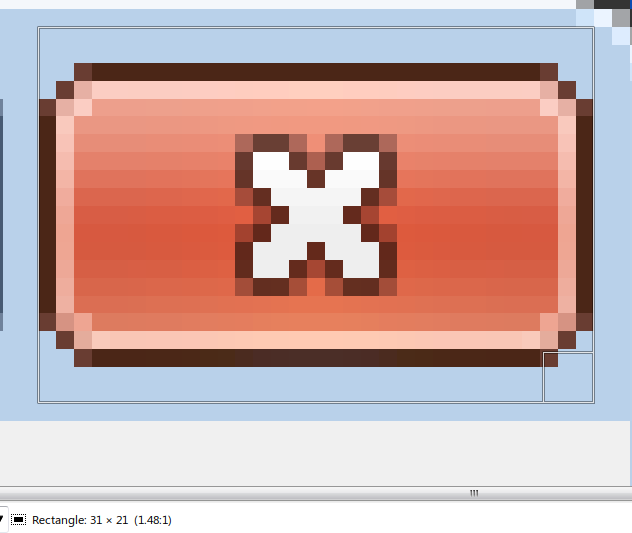 Aero 7.5 Style - 28x17px texture size
Visualizing the sampled points #
After a few failed attempts at getting a decisive formula and thus the solution to our problem, we at least had a few observations:
- The calculations depend on the button texture size and the configured caption size
- The aspect ratio of the button texture size affects the result
- There are top and bottom 2px margins (as mentioned above) that seem to also play a role in the end result
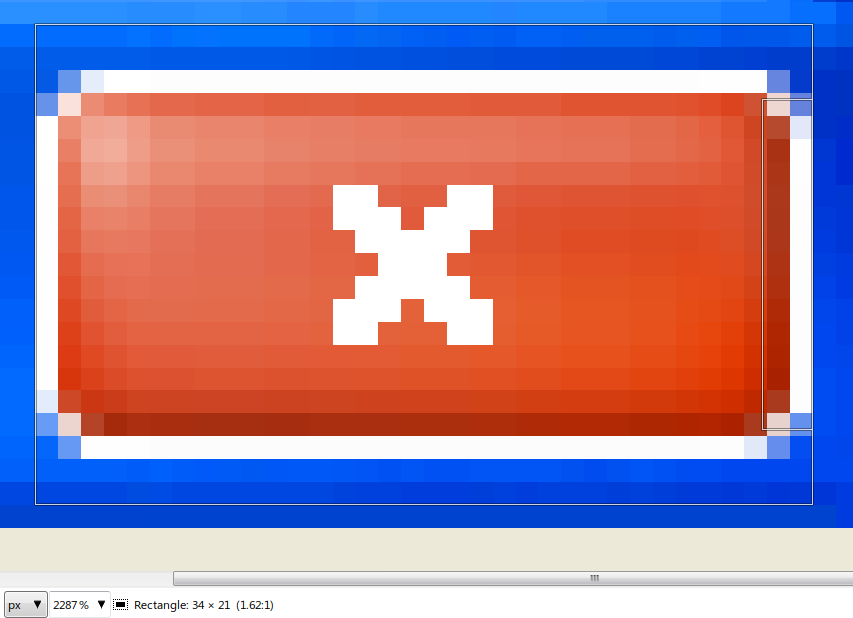 Comedy Style - 31x17px texture size, courtesy of Dominic Hayes. This one was a real curveball
But more measurements from different themes kept showing counterintuitive results which put doubts into some of our assumptions. Blindly guessing functions being obviously ineffective, I decided to put the sampled points we have collected on a graph and hopefully draw some conclusions based on that. The main difference between this and similar close approximations that I've done before is that there are now multiple sets of data to go off on (and also, relationships between inputs and outputs are much simpler here).
With a bunch of sampled points like this, we want to construct some kind of function that best matches the measured behavior. This is often done using linear regression, and luckily for us, Desmos can easily generate a linear function for a set of points with this method.
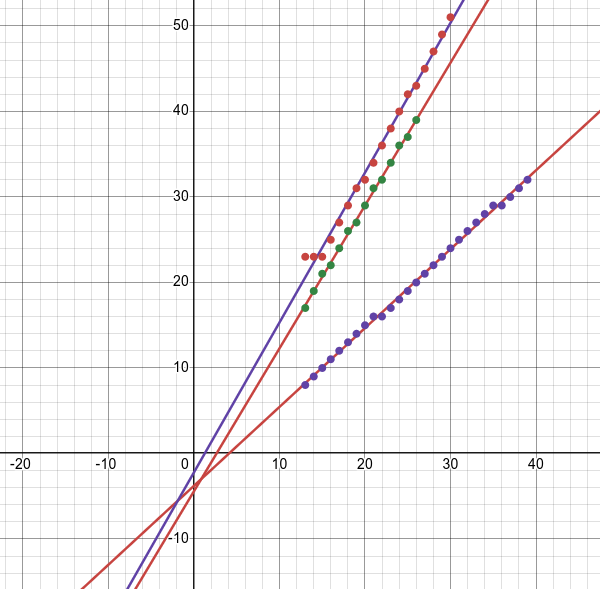 Linear regression in action. Is there anything related between these three functions?
The key observation here is that the sampled points, when graphed, resemble a function with linear behavior (or just a linear function for short). Of course, the points do have a staircase pattern, but that's the result of rounding being necessary (You wouldn't render a fractional pixel, right? :^) ) . The underlying function seems to be linear, but are there more conclusions we can draw from this?
Since it's presumably a linear function, let's consider what the slope and intercept are. Given our previous assumptions, I considered the idea that the slope represents the aspect ratio of the button texture sizes. Let's look at the generated functions, and compare the slope coefficients with the aspect ratios:
aero(x) = 1.67033x - 4.42857
28/17 - 1.67033 ≈ -0.0233
comedy(x) = 1.83591x - 4.30547
31/17 - 1.83591 ≈ -0.0123
office(x) = 0.922466x - 3.79894
13/14 - 0.922466 ≈ 0.0061
Those are all suspiciously similar values to the real aspect ratios, meaning that we have a pretty strong argument for the correlation being true for all the generated linear functions, as the margin of error is close to 0. In other words (setting rigorous proofs aside), the slope of our linear function indeed is the aspect ratio of the button texture.
Using analogous reasoning, it was also somewhat safe to conclude that the intersect value is -4, as all the generated intersect values 'danced' around it. This, I'm pretty sure, comes from the omnipresent top and bottom 2px margins as seen before in the screenshots.
The last thing to consider is the rounding method. This one isn't particularly fun to talk about, it just so happens that the result gets rounded up if the fractional part is ≥0.5, otherwise the result is rounded down.
So in the end, we have the following formula!
import math

def roundf(x):
     if x - math.floor(x) >= 0.5:
         return math.ceil(x)
     return math.floor(x)

def getWidth(size, width, height):
     return roundf((width/height)*size - 2 - 2)
Now, all of this is very shaky and guided mainly by intuition (proof by intuition), so I'll let the data speak for itself (here's also the relevant post on GitHub). The cool thing is that this works in general, even if we make the caption buttons unreasonably small, so small that the 9-slicing practically stops working.
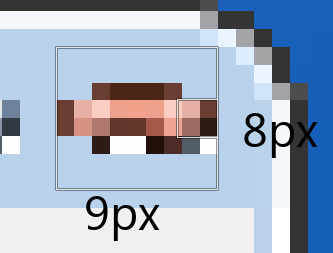 Aero 7.5 - Size 8
Conclusion #
In conclusion: regression analysis is pretty cool. A slightly less important problem to solve would be figuring out how the 'Advanced Appearance' page calculates the lower bound for caption button sizes as mentioned above, but it's not that big of a deal. Many thanks to Dominic Hayes for the collaboration and being a good friend. Make sure to check out pymstheme, as well as our other projects that are in the works!
By WackyIdeas
 This site supports RSS!
 Buy me a beer!